In development · iPhone & iPad · iOS 17+

Your focus session,
cooking.

A pomodoro-style study timer where the countdown isn't numbers — it's food. Set your duration, hit Start, and watch fries go from pale to golden to crispy as the minutes tick down. When you're done, the basket slides out and confetti flies.

Visual countdown you can feel 1–180 minute sessions No account required Your sessions stay on device
why visual?

A timer you can see works differently than one you can read.

Plain countdowns are easy to ignore. A glance at "23:14" tells you very little about how far you are or how long you have left — your brain has to do the math. Visual timers skip that step. Progress is just there, in the shape and color of something familiar.

1

Progress you feel, not parse

The fries gradually brown. The heating coils glow warmer. Steam rises. You don't have to translate a number into a feeling — the feeling is the interface.

2

A reason to glance back

Most timers are set-and-forget. This one rewards a glance — "oh, almost ready" — without yanking you out of the work. A low-stakes cue to stay on task.

3

Externalized time

Time that lives outside your head is time you don't have to track in your head. That frees up attention for the actual task.

4

A clear, satisfying endpoint

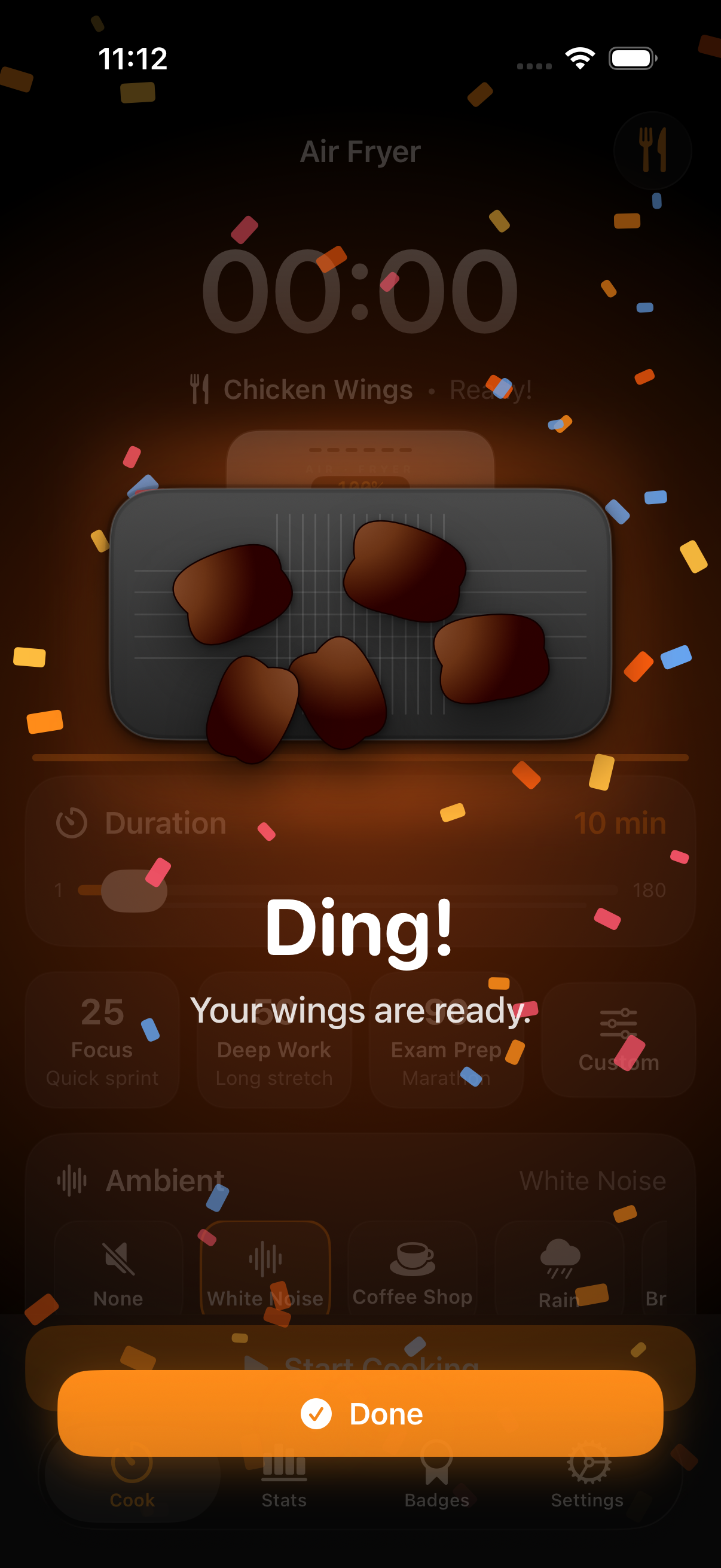
The basket slides out, the food is finished, confetti flies. Completion is a moment — not a beep — which makes finishing feel like a small win, every time. Stats roll up automatically. Achievements unlock when you cross milestones (your first session, a 7-day streak, ten hours of deep work).

built for

Anyone whose attention has a mind of its own.

Made calm, predictable, and tactile

Visual timers are quietly popular with students cramming for exams, designers in deep focus, writers who need a soft container for a draft, and many people in the ADHD community who find a tangible, externalized timer easier to actually use than a number on a screen.

Air Fryer Timer isn't a medical device and doesn't diagnose or treat anything. It's a focus tool that happens to be designed with attention differences in mind.

Air Fryer Timer app icon
take a look

Designed for both modes you actually work in.

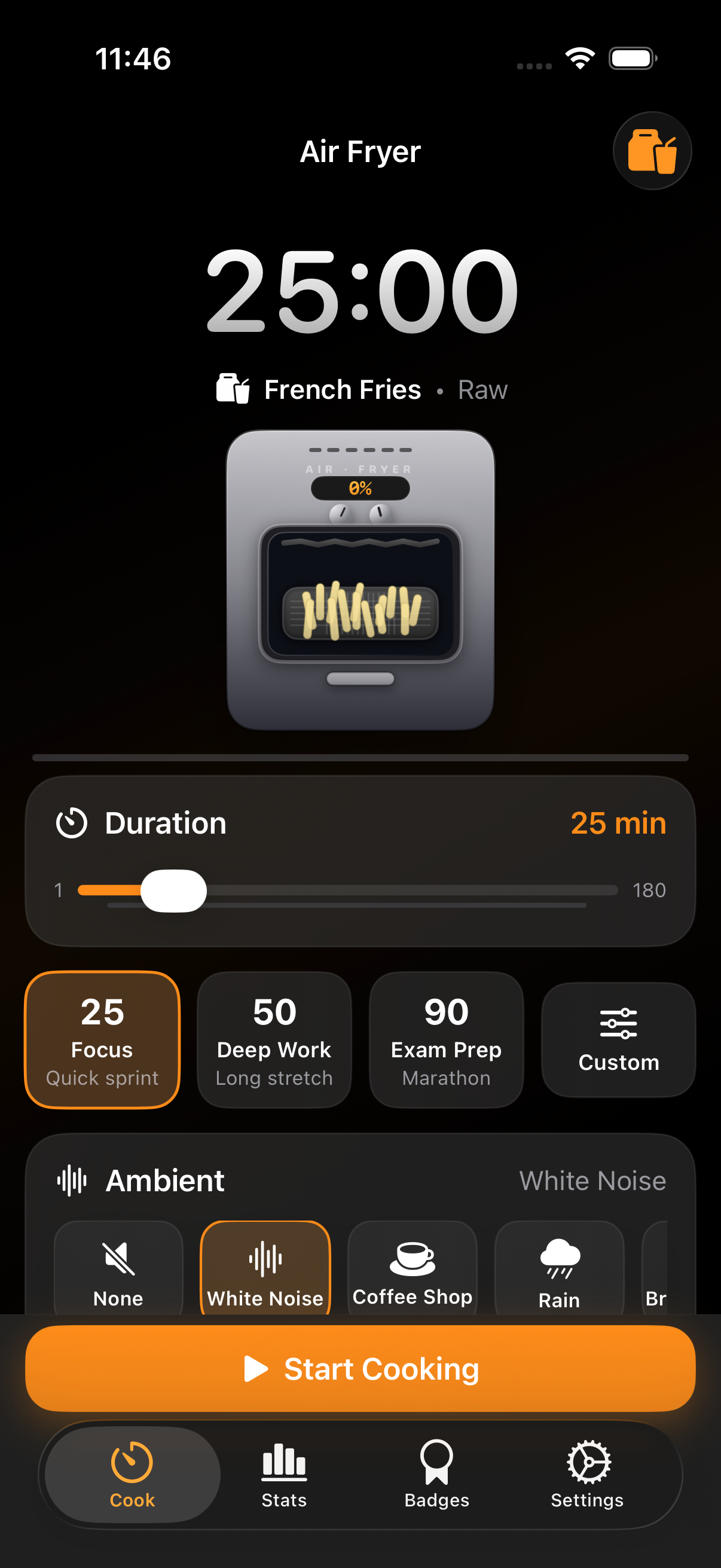
Air Fryer Timer home screen — duration slider, presets, ambient picker
Home — pick duration, theme, sound
Focus Mode mid-cook — golden fries glowing inside the fryer
Focus Mode — only the work remains
Completion celebration with confetti and finished food
Completion — finishing should feel like finishing
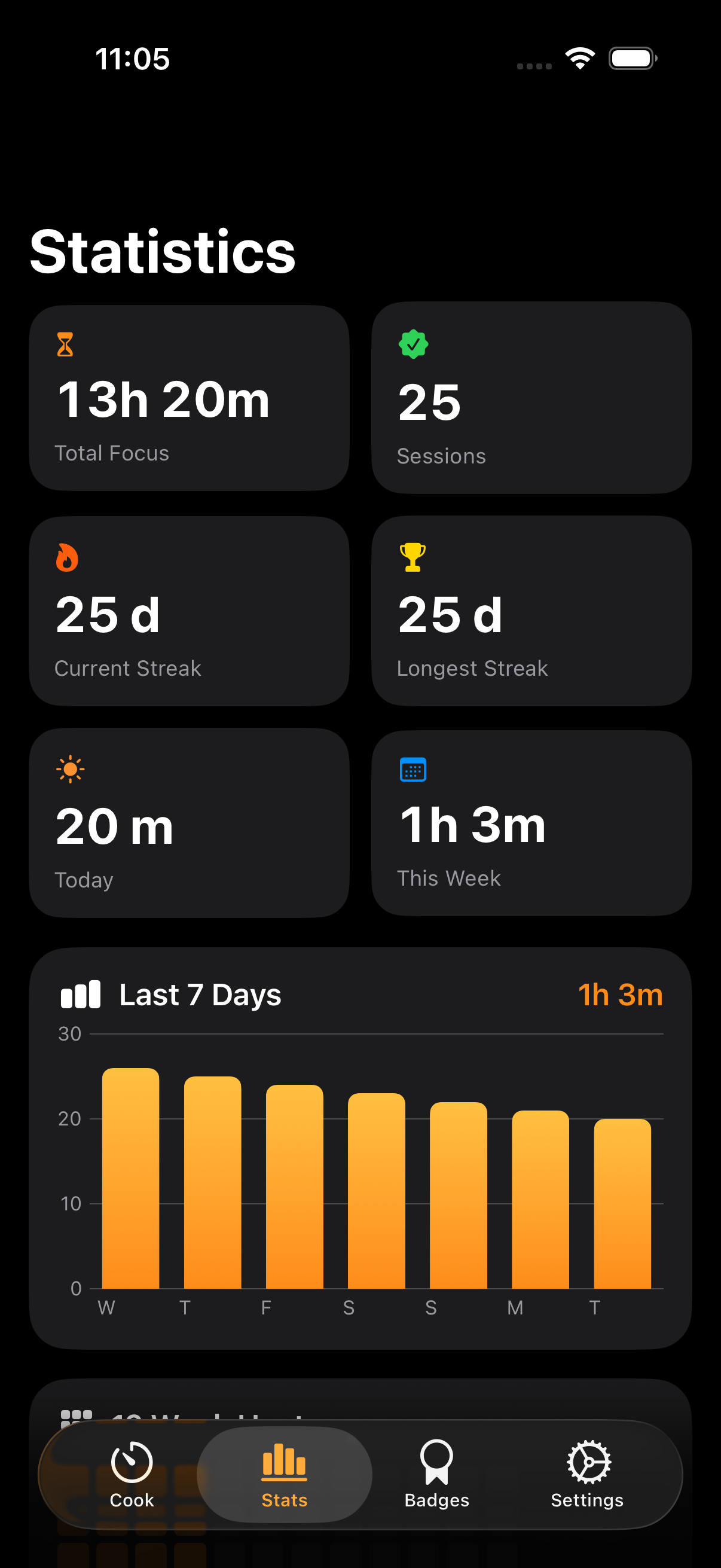
Statistics view — totals, streaks, 7-day chart
Stats — a private record of your focus
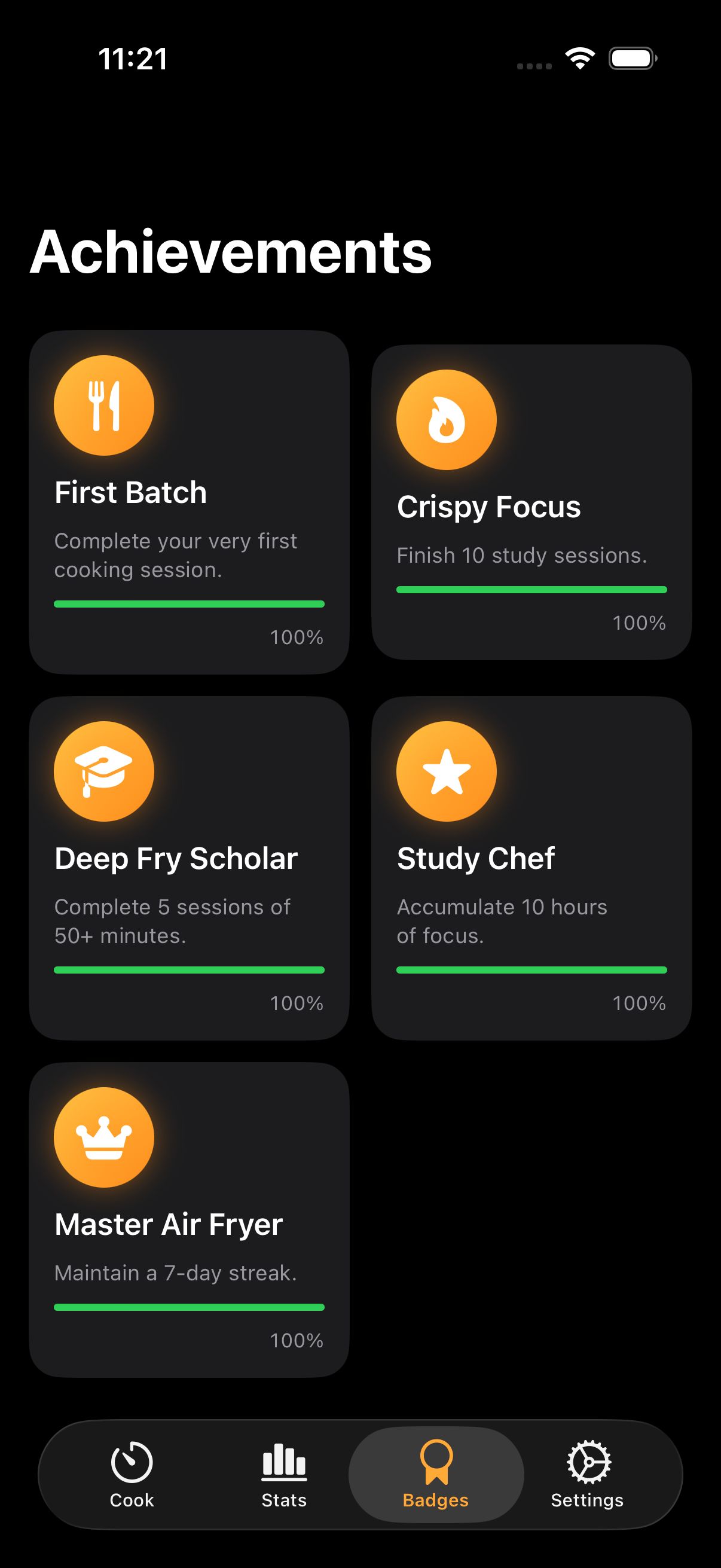
Achievements grid
Badges — quiet milestones to look forward to
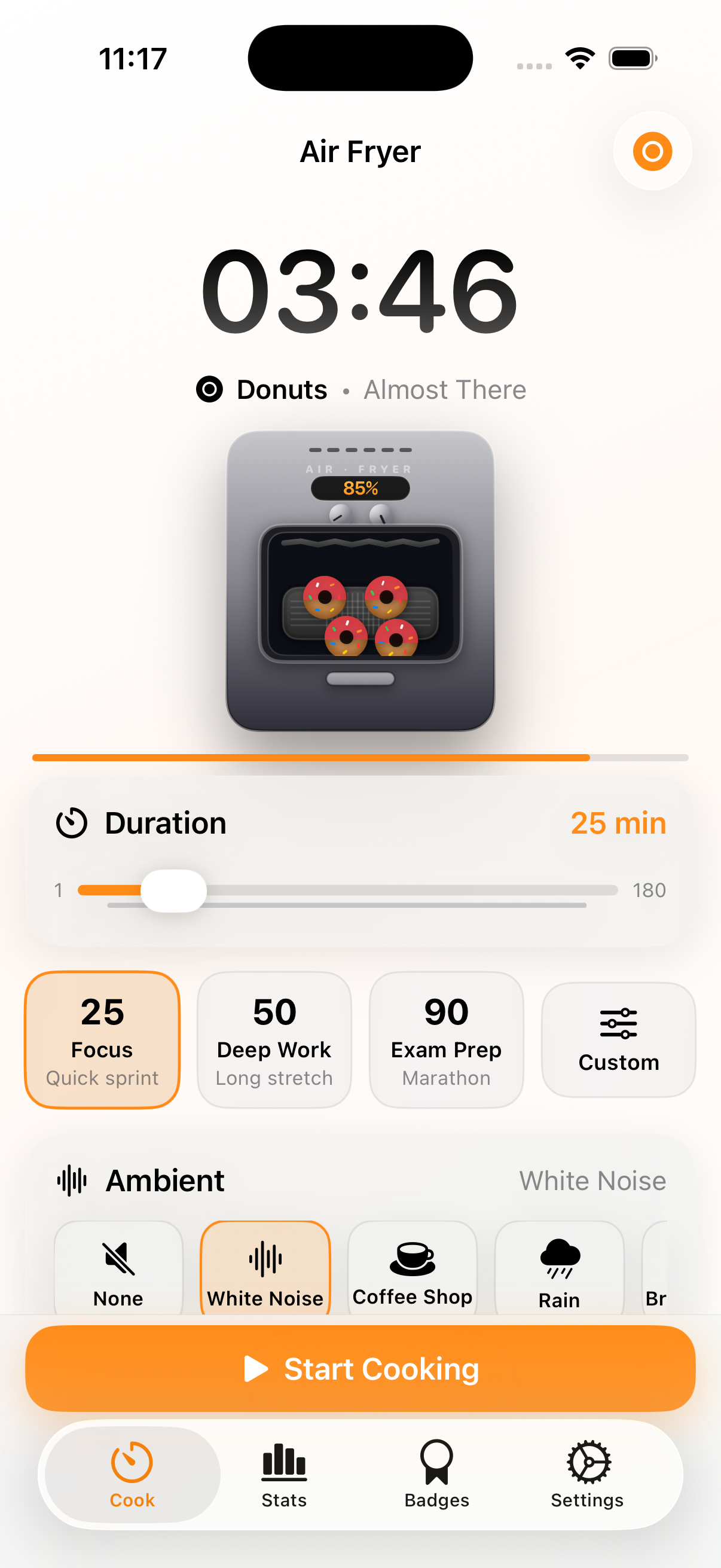
Light mode with donuts theme
Light mode & 5 food themes
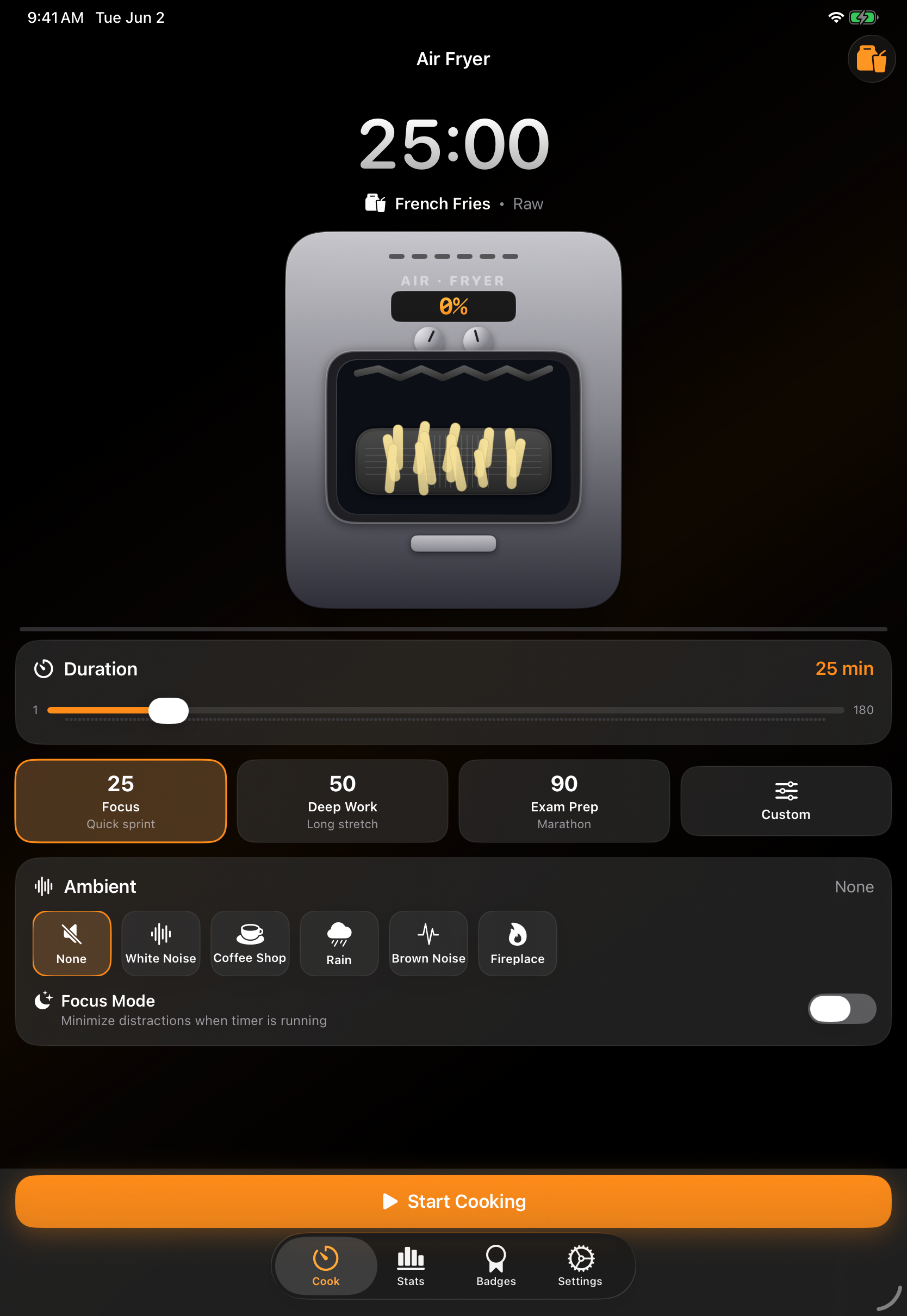
Air Fryer Timer on iPad with the same bottom tab bar
iPad — same familiar layout
everything inside

The whole point is the details.

Every part of the app is something you can actually see, hear, or feel — the fryer chassis, the steam, the sound, the haptics on completion. A focus timer that takes itself just a little bit seriously.

A real-looking fryer

Stainless chassis, glass window, glowing coils, rising steam, a basket that shakes every couple of minutes. Built entirely in SwiftUI — no images, all live shapes.

1–180 minute sessions

From a 1-minute breath to a 3-hour marathon. Three handy presets: 25-min Focus, 50-min Deep Work, 90-min Exam Prep.

Procedural ambient sound

Five built-in soundscapes — white noise, rain, coffee shop, brown noise, fireplace — generated in real time. No downloads. Mixes with what you're playing.

Background-correct timing

Keeps perfect time when you lock your phone. Live Activity and Dynamic Island indicator stay visible the whole session.

Focus Mode

One tap hides the tab bar, controls, and status bar — leaving just the fryer and the time. The fewest pixels asking for your attention.

Stats that respect you

Total focus, streaks, 7-day chart, 12-week heatmap. No leaderboards, no shaming, no shared data.

Five quiet achievements

First Batch. Crispy Focus. Deep Fry Scholar. Study Chef. Master Air Fryer. They unlock as you actually do the work — no streak guilt.

5 food themes

French fries, chicken wings, cookies, donuts, or roasted veggies. Each has its own raw-to-done color ramp and shapes.

iPhone + iPad

Adaptive layout — portrait stacked, iPad landscape split. Same familiar bottom tab bar on both. Dark mode by default, light mode when you ask.

common questions

The short answers.

Is this a medical or therapeutic app?
No. Air Fryer Timer is a focus / productivity tool. It isn't designed or tested to diagnose, treat, or manage any condition. We mention the ADHD community because many people there find visual timers helpful in general — but that's an observation about a tool, not a claim about a treatment. If you're working with a clinician, this app is just one of many things you might find useful (or not).
How is this different from a regular pomodoro timer?
The math is identical — you pick a duration, the app counts down, you take a break. The difference is how progress is shown. Instead of "23:14 remaining," you see fries gradually browning. For many people, that visual cue is easier to glance at and harder to ignore than digits, and the completion feels like an actual moment.
Does it keep timing if I lock my phone?
Yes. The app stores the session's exact end time, so backgrounding, locking, or switching apps doesn't drift the timer. A Live Activity and Dynamic Island indicator stay visible while a session is running, and a local notification fires the moment cooking finishes.
What about my data?
Your session history, achievements, and preferences stay on your device — JTR Labs never receives them. The app stores them in a local JSON file inside its private container; Settings → Reset All Data wipes them in one tap. Google AdMob (the only third-party SDK in the app) handles ad-related data on Google's side; full details are in the Privacy Policy.
Are there ads, subscriptions, or in-app purchases?
There's one interstitial ad shown after a completed focus session, with frequency caps so it doesn't appear after every session. Ads keep the app free. No subscriptions, no in-app purchases, no nags, no upsells. When iOS asks whether to allow tracking, declining keeps the app fully functional and switches ads to non-personalized.
Does it work on iPad?
Yes. iPad gets the same bottom tab bar as iPhone, with a roomier layout in landscape (fryer on the left, controls on the right). Split View is supported.
your data

Your sessions stay on your device.

JTR Labs doesn't collect your session history, achievements, or preferences — they live in a local file on your phone and Reset All Data wipes them instantly. The app shows an occasional ad after a session (Google AdMob, full disclosure on the Privacy page), and iOS lets you decline tracking when first asked.

No account required Sessions never leave your device Decline tracking, app still works Only one third-party SDK (AdMob)
coming soon

Cook your next focus session.

iPhone & iPad · iOS 17+ · free, ad-supported

Email us to get notified