
Go where your life needs you.
Build toward the errands, visits, appointments, and opportunities that matter to you.
SteadyDrive helps you prepare for driving, practice in smaller steps, choose routes that fit the day, and notice the progress you are already making. No pressure. No shame. Just a steadier way forward.
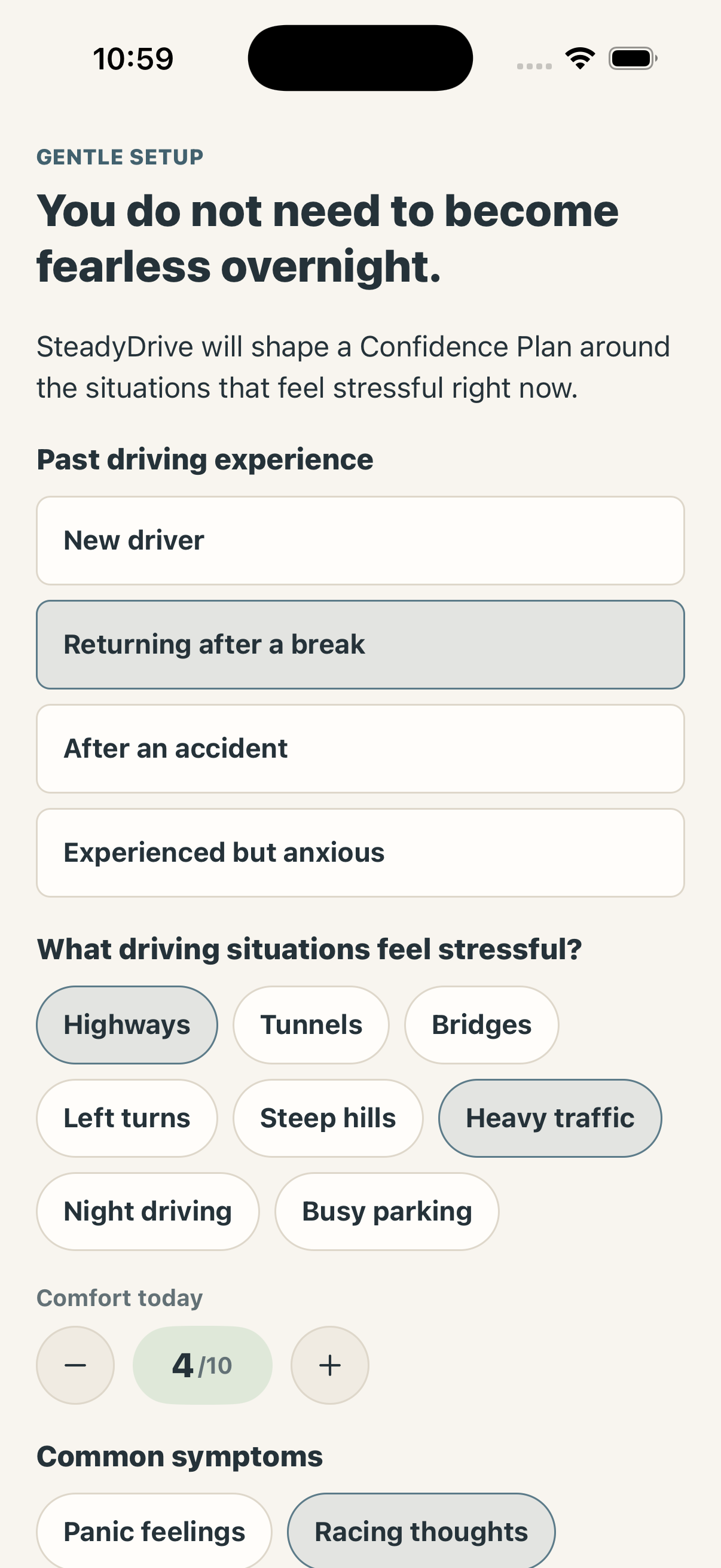 Actual app screenshot
Feeling unsure about driving can shape work, errands, family plans, social time, and independence. SteadyDrive turns a vague, difficult goal into smaller choices that feel easier to approach.
Build toward the errands, visits, appointments, and opportunities that matter to you.
Replace “I should drive more” with one clear, manageable step and a familiar return point.
Keep a private record of what felt easier, what was difficult, and what you want to repeat.
Every feature is designed around preparation, low-pressure repetition, and fewer decisions when you are already focused on the road.
Choose the situations that feel difficult, describe your driving background, and set a goal. SteadyDrive turns those answers into a short sequence of practice steps.
Begin parked, move to a familiar block, and increase the challenge only when the previous step feels repeatable. You can reduce the difficulty at any time.
Enter your own starting point and destination, compare route options, mark situations you want to avoid, and save only the routes that are useful to you.
Record comfort levels and short notes after you park. See completed steps, practice days, and recent progress without scores that pressure or shame you.
Use short, readable grounding steps before starting the car. They are simple enough to remember and easy to revisit whenever you need a quieter beginning.
When movement may indicate driving, SteadyDrive hides detailed controls and keeps only large, essential actions visible. Full interaction returns after you confirm you are parked.
You are always in control of the pace, the route, and what counts as enough for today.
Select the driving situations you want help approaching and choose a goal that matters to you.
See a sequence that begins with a low-pressure step and grows gradually from there.
Choose familiar roads, quiet conditions, and a clear return point. Repeat as often as you need.
After parking, record what went well and decide whether to repeat, reduce, or gently expand the next drive.
SteadyDrive is built primarily for use before driving and after you have parked. Route choices, notes, settings, and detailed exercises should never compete with driving.
Choose the route, adjust settings, and put the phone away before starting the drive.
The driving screen favors large targets, brief wording, and as few choices as possible.
Detailed interaction stays out of the way until you confirm the vehicle is safely parked.
SteadyDrive complements responsible practice and qualified driving instruction; it does not teach vehicle operation.
Personal reflections and route preferences can feel sensitive. SteadyDrive limits what it collects, explains why information is needed, and gives you direct controls for export and deletion.
Your activity is not used to build an ad-targeting profile.
Route planning starts with locations you choose to enter.
Signed-in users can restore their own plan and saved progress across devices.
Download your information or request deletion from the app.
Learn offers straightforward ways to make the next drive feel more familiar and manageable.
A five-minute familiar route is a valid practice session.
Start with daylight, lighter traffic, and comfortable weather.
Know where you can turn around, park, or pause safely.
Increase the time, distance, or traffic level—not all three at once.
Drop your shoulders and hold the wheel firmly without squeezing.
After parking, notice one part of the drive you handled well.
It is for people who feel nervous, hesitant, rusty, or less confident about driving—including new drivers, people returning after a break, and anyone rebuilding comfort with particular roads or situations.
No. SteadyDrive supports planning, preparation, and personal practice tracking. Vehicle operation and road skills should come from qualified instruction and the rules in your area.
No. The plan is flexible. You can repeat a step, make it smaller, take a break, or return when conditions feel right. There are no streak penalties.
You enter your starting location, destination, and current preferences. SteadyDrive can compare options, but you decide which route—if any—you want to use.
SteadyDrive is intended mainly for preparation before driving and reflection after parking. Do not interact with detailed app features while operating a vehicle.
You can begin locally. Linking an account enables supported cross-device restoration and keeps each user’s saved progress separate.
Build a plan around the roads, situations, and goals that matter to you. Repeat what works. Adjust what does not. Let small drives count.