Blue light filter for Mac

Your screen was never meant for midnight.

Gloam filters blue light at the display driver level — not a tinted window overlay. Every pixel shifts warm with the sun, so your brain knows when the day is done.

macOS 13+ No account required Zero tracking
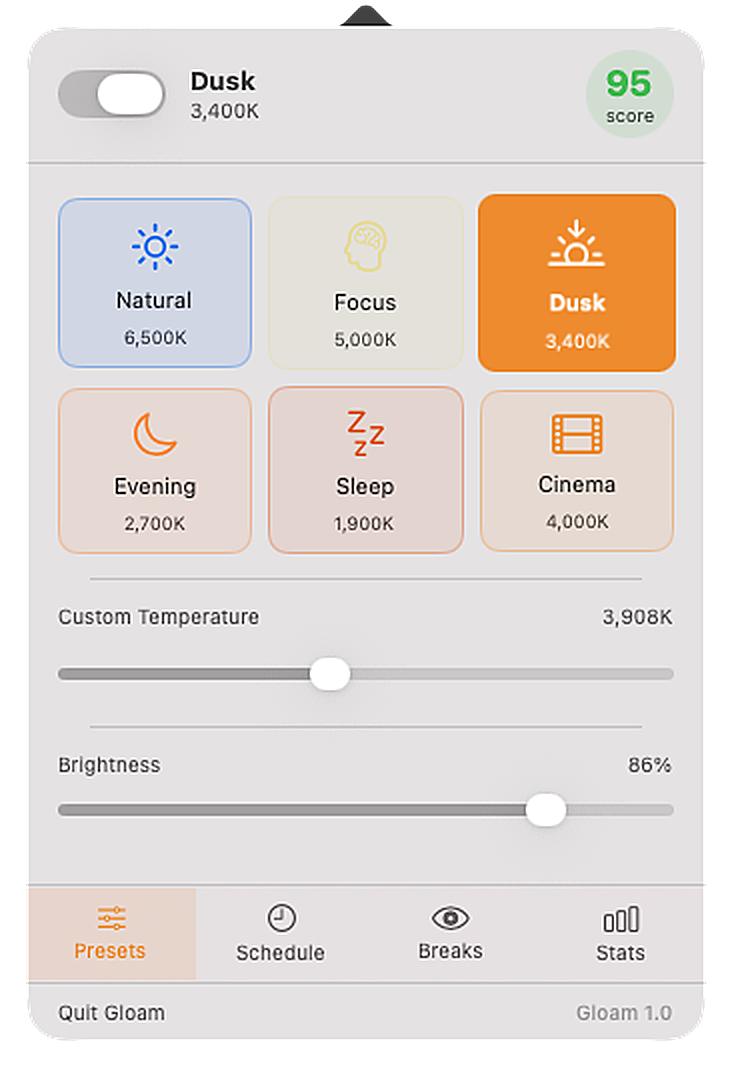
Gloam popover — live screenshot from the real app
Live screenshot · Gloam 1.0 on macOS
The difference

Most blue light filters
don't actually work.

They paint a semi-transparent tinted window over your screen. The display beneath is still emitting the same spectrum. Gloam skips the overlay and talks directly to the display driver.

Overlay approach
A tinted window on top
Blue light leaks around every edge, through every transparent UI element, and from the backlight itself.
blue light still here →

  • Skips transparent UI (Dock, menus, alerts)
  • Backlight unchanged — still emitting blue
  • Can conflict with HDR and True Tone
Gloam — gamma ramp
Driver-level, every pixel
Gloam uses CGSetDisplayTransferByTable — the same API macOS uses internally for Night Shift.
warm output
at the display level

  • Affects every pixel, every app, every layer
  • Works on all display types including HDR
  • Zero performance overhead
6 crafted presets

From daylight to dim.
There's a mode for every hour.

Each preset was tuned by feel, not just math. The color temperatures are chosen to match how your eyes actually adapt throughout the day.

☀️ Natural — 6500K
Daylight white, no filter
Full-spectrum. Use when you need accurate colors for design or photo work.
🧠 Focus — 5000K
Slightly neutral-warm
Gentle warmth for long code or writing sessions. Barely noticeable, genuinely helpful.
🌅 Dusk — 3400K
Warm ambient light
The golden hour preset. Kick this on around 5pm and your circadian clock will thank you.
🌙 Evening — 2700K
Incandescent warmth
Matches the warm glow of tungsten bulbs. Good for winding down before bed.
💤 Sleep — 1900K
Deep red, minimal blue
The least melatonin-disruptive mode. For late-night scrolling you can't help doing.
🎬 Cinema — 4000K
Film projection warmth
Warm enough to be easy on the eyes in a dark room, neutral enough for movies to look right.
How it stacks up

Gloam vs. f.lux vs. Iris Tech.

Three apps, three different philosophies. Here's the honest comparison — including where the others have been around longer and are worth knowing about.

Gloam f.lux Iris Tech
Pricing Free + $14.99 one-time Free (donation) $1.99 / month subscription
Filtering method Gamma ramp — driver level Gamma ramp — driver level Overlay + optional gamma hybrid
Named presets 6 tuned presets Manual — sliders only Many modes
Circadian auto-schedule NOAA + real GPS Location-based Location-based
20-20-20 break reminders Built-in, full-screen Partial — add-on feature
Menu bar health score Live 0–100 score
Per-app filter profiles Pro feature Paid tier
Account required No account, ever No account Account required
Data collection Zero — none at all Minimal Usage analytics
Native macOS (SwiftUI) Apple Silicon first Partial — older Obj-C codebase Web-based UI layer
Windows version Coming — Pro license included Available now Available now
Global hotkey cycling ⌘⇧I — Pro Limited Paid tier

Comparison reflects publicly available information as of May 2025. f.lux is a well-established app we respect — if you want Windows support today, it's a great free choice. Iris Tech offers more advanced options for power users willing to pay monthly. Gloam is for people who want clean, native macOS software with no recurring costs and no accounts.

Everything Gloam does

The full feature list.

No marketing fluff — every feature Gloam ships with, listed plainly.

🖥️
Driver-level gamma filtering
Uses CGSetDisplayTransferByTable — the same macOS API as Night Shift — to remap every pixel at the display level. Not a window overlay.
🎨
6 hand-tuned presets
Natural (6500K), Focus (5000K), Dusk (3400K), Evening (2700K), Sleep (1900K), Cinema (4000K). Each with smooth animated transitions between 1–3 seconds.
🌅
Circadian auto-schedule Pro
Uses the NOAA solar algorithm with your real GPS location for minute-precise sunrise and sunset times. No manual time entry. Just enable and forget.
🎚️
Manual temperature & brightness sliders
Full control from 1000K–6500K and 0–100% brightness. Adjust independently of presets. Changes apply in real time with no lag.
👁️
20-20-20 break engine
Full-screen break overlay every 20 minutes (configurable: 15, 20, 30, 45, or 60 min). Countdown timer, amber ambient design, skip button. Entirely optional — toggle off and it disappears completely.
📊
Live eye health score
A 0–100 score displayed in your menu bar alongside the eye icon. Calculated from filter activity, warmth level, and break compliance throughout the day.
📱
Per-app filter profiles Pro
Assign a different preset to any app. Lightroom gets Natural automatically; Terminal stays on Evening. Gloam watches app focus and switches instantly.
⌨️
Global hotkey preset cycling Pro
Press ⌘⇧I from any app to step through presets without opening the popover. The cycle order follows the warmth gradient — Natural → Focus → Dusk → Evening → Sleep.
🗓️
Manual sunrise/sunset times
Don't want GPS on? Set your own sunrise and sunset times manually. The schedule engine uses them exactly, with no approximation.
Instant filter toggle
One click in the menu bar popover toggles the filter off entirely. Your preset is remembered — click again and it comes straight back. Good for color-critical moments.
🔒
Zero data collection
No account. No telemetry. No analytics. No network requests — Gloam never phones home. All settings live in your local UserDefaults. Your screen data never leaves your machine.
🚀
Launch at login
One toggle in Settings and Gloam starts silently with macOS. No dock icon. No splash screen. It's just there, doing its job.
🖥️
Multi-display support
The gamma ramp applies to all connected displays simultaneously. Works with external monitors, projectors, and ultra-wide setups that support driver-level gamma control.
🪟
Windows version (coming) Pro
In active development. Uses the same driver-level gamma approach on Windows 11 — no overlay. Pro licenses purchased now include the Windows version at no extra charge when it ships.
20-20-20 breaks

The only break reminder you won't dismiss in two seconds.

Every 20 minutes, look at something 20 feet away for 20 seconds. It actually works — optometrists have been saying this for years. We just built the overlay that makes you do it.

  • Full-screen overlay — can't be clicked past accidentally
  • Countdown timer so you know exactly when it's over
  • Skip button for the meetings that run long
  • Configurable interval: 15, 20, 30, 45, or 60 minutes
  • Entirely optional — toggle off and it's gone
👁
Rest your eyes
Look at something 20 feet away and blink naturally.
9
Skip break
Pricing

Simple. Honest. No subscription.

One payment. Works forever. All future updates included — because you shouldn't rent software you already own.

Free
$0
forever, no card required
  • 3 presets (Natural, Dusk, Sleep)
  • Manual temperature slider
  • Manual brightness control
  • Basic 20-20-20 break reminders
  • Menu bar eye health score
  • Circadian auto-schedule (GPS)
  • All 6 presets + Cinema mode
  • Per-app filter profiles
  • Break stats & history
  • Windows license (coming soon)
Download free →
✦ Most popular
Pro
$14.99
$19.99
Launch price — limited time
one-time · free updates forever
  • Everything in Free
  • All 6 presets including Cinema
  • Circadian auto-schedule with GPS
  • Per-app filter profiles
  • Break stats, streaks & history
  • Global hotkey preset cycling (⌘⇧I)
  • Windows license when it ships
  • Priority support
  • All future features
Get Gloam Pro — $14.99

Email us with any questions — we actually respond.  ·  30-day money-back guarantee on Pro.

🪟 Windows 11
Coming to Windows this year.
Same driver-level approach — no overlay, no compromise. Pro licenses include Windows when it ships. Drop your email to get notified at launch.
Common questions
How is Gloam different from macOS Night Shift?
Night Shift uses the same underlying API (CGSetDisplayTransferByTable) but offers very limited control — three settings, no scheduling granularity, no presets, no break reminders. Gloam gives you the full range: 1900K to 6500K, 6 tuned presets, GPS-precise auto-scheduling, per-app profiles, and a 20-20-20 break engine. Think of Night Shift as the sketch and Gloam as the finished product.
Does it work on Apple Silicon (M1/M2/M3/M4)?
Yes. Gloam is compiled native for Apple Silicon. It runs lean — no Intel translation layer, no background agents, no launch daemons. It's a single menu bar process.
Does it work with external monitors?
Yes — Gloam applies the gamma ramp to all connected displays simultaneously. If your external monitor supports gamma control through the display driver (most do), it'll warm evenly across all screens.
Will it interfere with color-accurate work?
When Gloam is on Natural (6500K), it makes no changes to the display — the gamma ramp is identity. You can also toggle the filter off instantly from the menu bar. Many designers keep Natural as their work preset and set an auto-schedule to warm up after sunset.
What does "per-app profiles" mean?
With Pro, you can assign a different preset to specific apps. Set Preview and Lightroom to Natural automatically, while the rest of your system stays on Evening. Gloam watches for app focus changes and adjusts instantly.
Is there a free trial for Pro?
The Free tier is a real product, not a crippled trial. Use it as long as you want. If you upgrade and it's not right, there's a 30-day money-back guarantee — no questions asked.

Your eyes have been waiting for this.

Free to start. Runs silently. Your sleep will improve before you remember you installed it.

↓ Download for Mac — Free Compare plans

macOS 13 Ventura or later · Apple Silicon & Intel · 2.4 MB